Free Pinterest dark mode extension by SortPin
Pinterest Dark Mode for PC, Mac & Chromebook — Chrome, Firefox & Safari
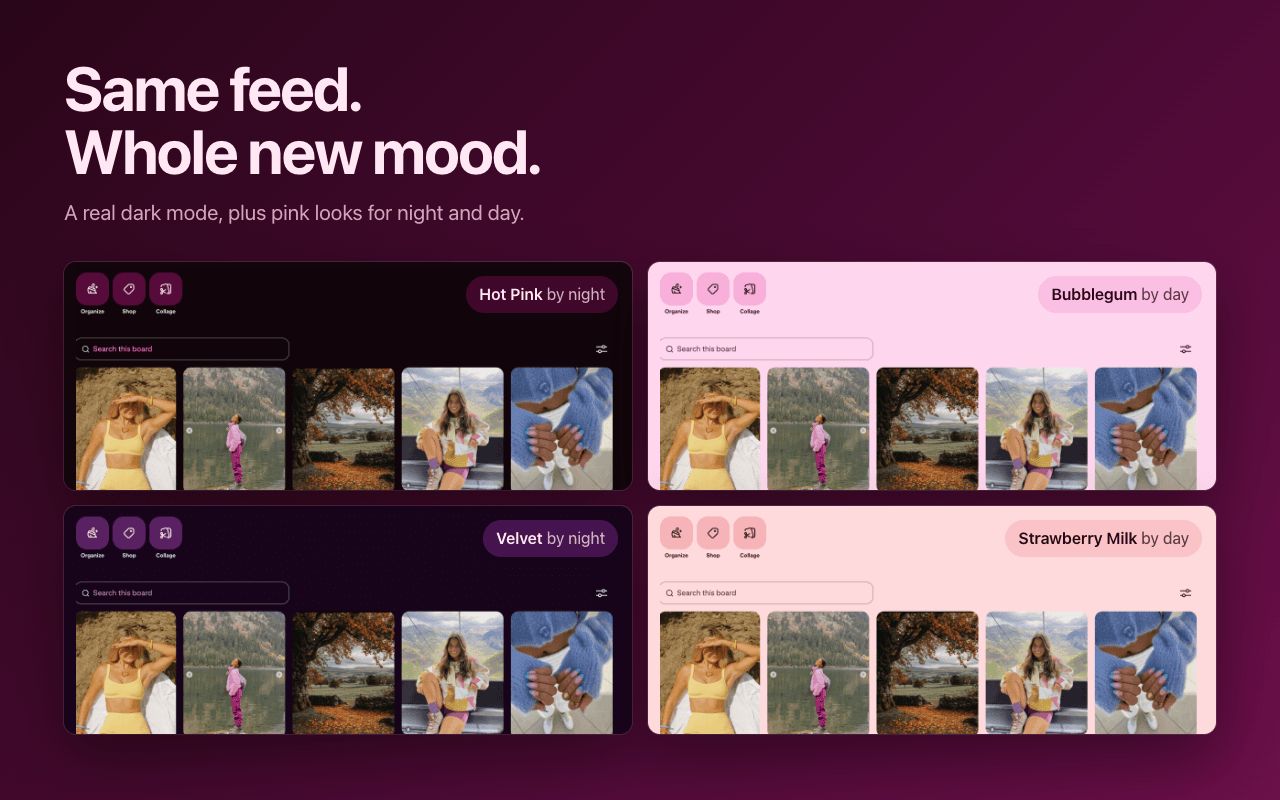
Pinterest doesn't offer dark mode on desktop — Dark Mode for Pinterest, our free extension, adds it in one click. A real dark theme in the night colors Pinterest designed for its own app, plus pink and color themes for night and day, AMOLED true black, a timed night mode, and no white flash. Free, and 100% private.
Also works in Edge, Brave, Opera & Arc via the Chrome Web Store. Updated .
Does Pinterest have dark mode on desktop?
No. As of 2026, Pinterest's dark mode is only available in the iOS and Android apps — Pinterest's own help center confirms there is no dark mode setting on pinterest.com in a desktop browser. The only way to get Pinterest dark mode on a PC, Mac, laptop, or Chromebook is a browser extension — and that's exactly what Dark Mode for Pinterest is.
Users have asked Pinterest for a desktop night mode for years. Until it ships one, Dark Mode for Pinterest fills the gap the honest way: instead of slapping a gray filter over the page, it uses the same night colors Pinterest already designed for its own app — so the result looks like Pinterest built it.
How to turn on Pinterest dark mode in your browser
Three steps, about thirty seconds, no account needed: install the extension for your browser, open pinterest.com, and pick a theme. In the stores it is listed as "Dark Mode for Pinterest — Pink & Color Themes" (on the Mac App Store, simply "Dark Mode for Pinterest"), by SortPin — the same name you'll see in your browser. Here's the exact route per browser.
Pinterest dark mode in Chrome — plus Edge, Brave, Opera & Arc
Open Dark Mode for Pinterest on the Chrome Web Store and click Add to Chrome. Chromium browsers — Microsoft Edge, Brave, Opera, Vivaldi, Arc — install from the same page too (Edge asks once to allow it, Opera needs its free "Install Chrome Extensions" add-on) and work the same way on Windows, macOS, Linux, and Chromebooks. Open Pinterest, click the Dark Mode for Pinterest icon in your toolbar, and choose your night theme; the page turns dark instantly.
Pinterest dark mode in Firefox
Open Dark Mode for Pinterest on Firefox Add-ons and click Add to Firefox; Firefox asks to let it work on Pinterest's sites, which is the only access it needs. Then open pinterest.com, click the extension's icon in the toolbar (or the puzzle-piece Extensions button), and pick a theme. It works the same in Firefox on Windows, Mac, and Linux — the same themes, the same Auto and Timed night mode, the same no-tracking promise as the Chrome version.
Pinterest dark mode in Safari on Mac
Download Dark Mode for Pinterest from the Mac App Store (free, requires macOS 12 or later), open the app once, then enable the extension under Safari → Settings → Extensions (Preferences on older macOS). It's a dedicated Pinterest dark mode extension for Safari — generic dark mode apps treat Pinterest like any other site and miss its layout entirely. Timed mode, the Extras and the newest looks (Hot Pink, Velvet, Graphite) come with version 1.3 of the Safari app, so keep it updated from the App Store.
How to get Pinterest dark mode on a Windows PC or laptop
- Open the browser you use for Pinterest — Chrome, Microsoft Edge, Firefox, Brave, and Opera all work on Windows 10 and 11, on any desktop or laptop.
- Install Dark Mode for Pinterest: from the Chrome Web Store in Chrome, Edge, Brave, or Opera (Edge asks once to allow extensions from other stores; Opera needs its free "Install Chrome Extensions" add-on first), or from Firefox Add-ons in Firefox.
- Open pinterest.com, click the Dark Mode for Pinterest icon in the toolbar (in Chrome and Edge, pin it from the puzzle-piece Extensions menu first), and pick a night theme. The page turns dark at once — no restart, no account.
Using the Pinterest app for Windows? It can't load browser extensions, so open pinterest.com in your browser instead — same account, same boards, real dark mode.
How to put Pinterest in dark mode on a Mac or MacBook
- Safari: get Dark Mode for Pinterest from the Mac App Store (free, macOS 12 or later) and open the app once. Chrome, Edge, Brave or Arc: install it from the Chrome Web Store. Firefox: install it from Firefox Add-ons.
- In Safari, switch it on under Safari → Settings → Extensions (Preferences on older macOS); if Safari asks, choose Always Allow on This Website for Pinterest. Other browsers turn it on as soon as it's installed.
- Open pinterest.com, click the Dark Mode for Pinterest icon in the toolbar (in Chrome, pin it from the puzzle-piece Extensions menu first), and pick a night theme.
On a Chromebook
A Chromebook runs Chrome, so the Chrome version works as-is: open Dark Mode for Pinterest on the Chrome Web Store, click Add to Chrome, then open Pinterest and choose a theme. On a school or work Chromebook, your administrator may need to allow extensions first.
A real dark mode, not a gray filter
Most dark mode extensions are all-purpose tools that darken every website the same way — they invert colors, guess at backgrounds, and hope for the best. On a visual site like Pinterest that approach shows: photos can get dimmed or tinted, patches of the page end up mismatched, and new tabs often open with a blinding white flash. Dark Mode for Pinterest was built for one site only — it dresses the whole page in the night colors Pinterest designed for its own app, and the page loads dark from the very first moment.
| Dark Mode for Pinterest | Generic dark mode tools | |
|---|---|---|
| How it themes | Pinterest's own night colors, shade for shade | A filter that inverts colors |
| White flash on load | Never — dark from the very first moment | Common on every new tab |
| Your pins & photos | True colors — never inverted, dimmed, or washed out | Often dimmed, tinted, or washed out |
| How much turns dark | Everything — menus, sidebar, search, comments, boards | The whole page by guesswork — mismatched shades, missed menus and popups |
| Price | Free, everything included | Often freemium with paid tiers |
| Data collection | None — never connects to the internet | Varies by vendor |
Generic tools like Dark Reader or Night Eye are fine for the whole web — but they were never built for Pinterest, and one Pinterest redesign can break them overnight. Dark Mode for Pinterest does one site, does it down to the last detail, and gets checked and fixed every time Pinterest changes its look.
Pinterest dark themes — plus soft day themes
Dark mode doesn't have to mean one shade of gray. Onyx is pure true black for AMOLED and OLED screens; Calico is the neutral dark in Pinterest's own night colors; Graphite is a soft charcoal with gentler contrast; and then it gets fun: Hot Pink (electric magenta), Velvet (deep plum), Black Cherry (warm rosewood), Persimmon (burnt orange), Gilded (black & gold), Mocha (coffee brown), Matcha (calm green), Coastal (ocean blue), Indigo (midnight violet), Aura (dreamy purple), and Coquette (pretty in pink).
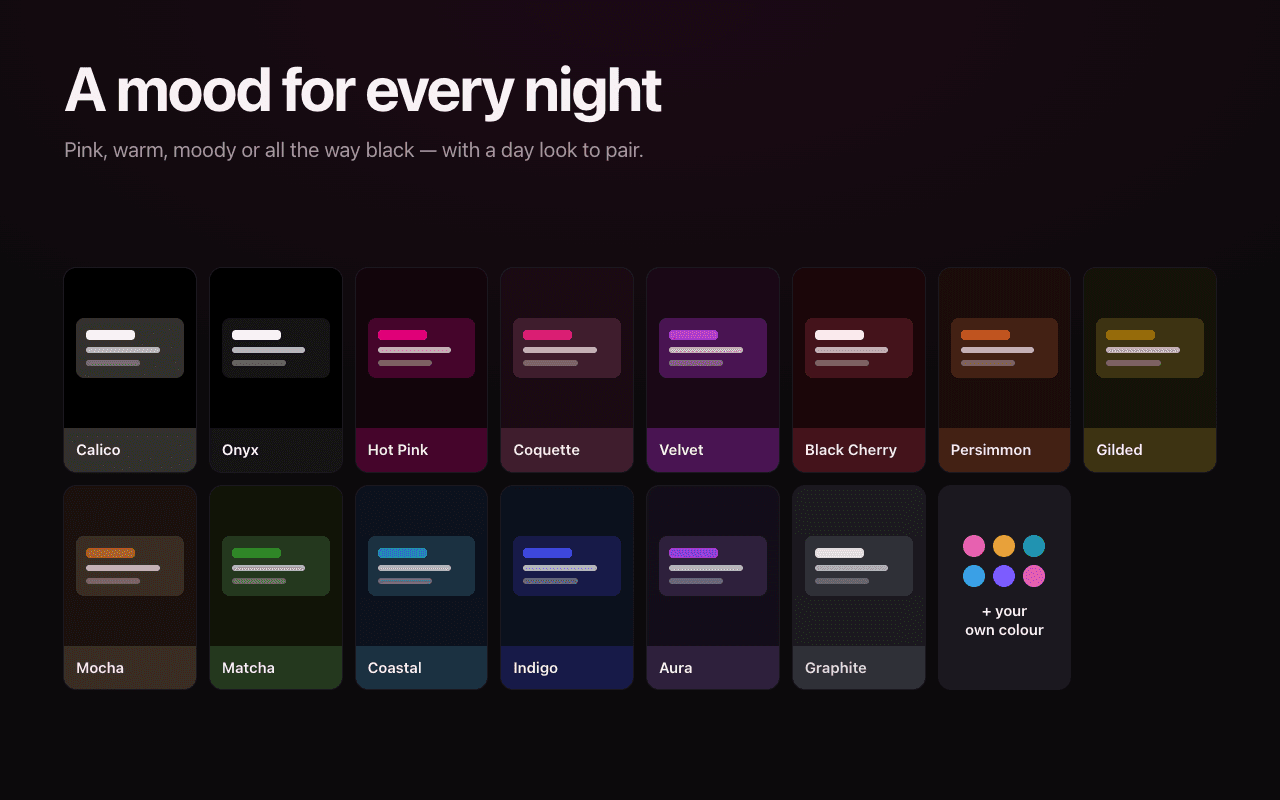
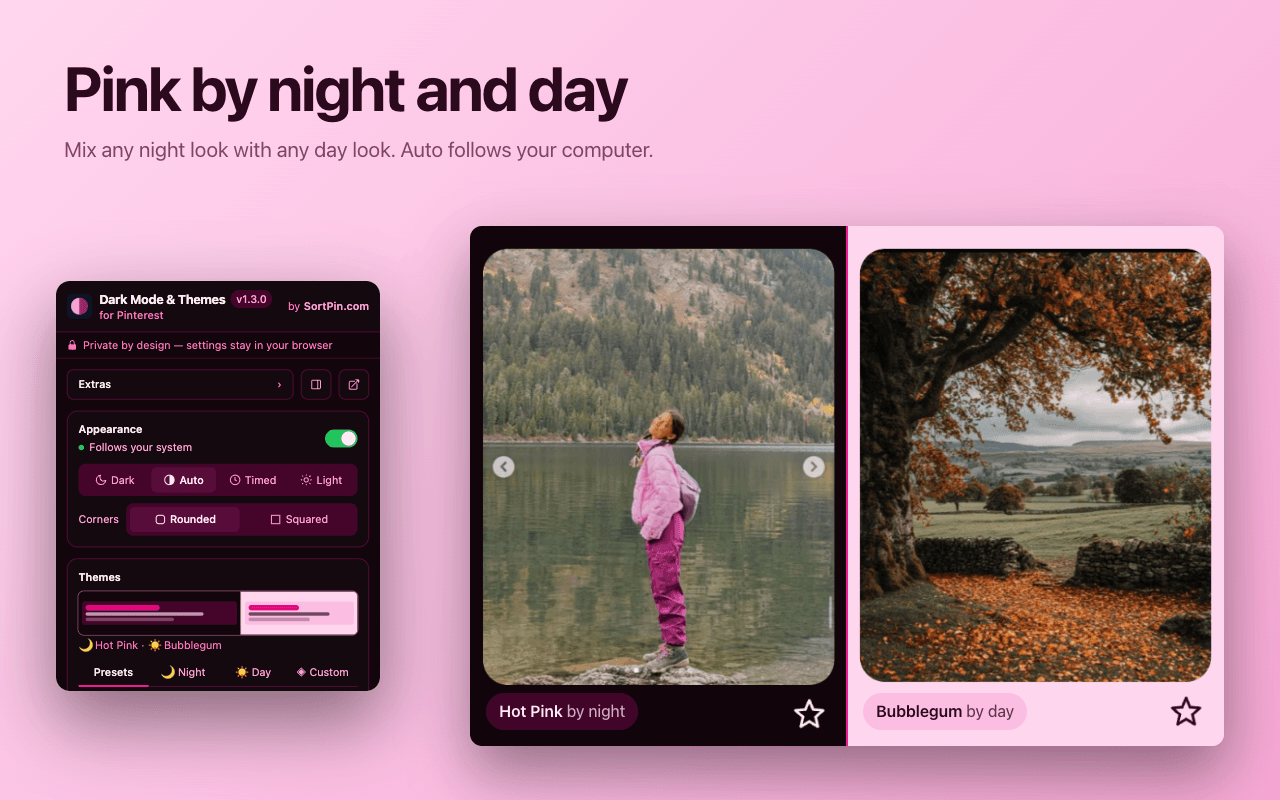
Most night looks come with a soft daytime face — Bubblegum, Ballet, Strawberry Milk, Apricot, Cream, Latte, Meadow, Sky, Periwinkle, Lilac, or Blush — and Auto switches between them with your system, or Timed at the hours you set. You can also mix and match any night look with any day look. Prefer the original Pinterest by day? Keep Vanilla, and Pinterest keeps its own colors until night. There's also a custom color picker: choose any hue or paste a hex code, and the extension tints both your day and night themes from that one color.
Squared corners — remove Pinterest's rounded corners
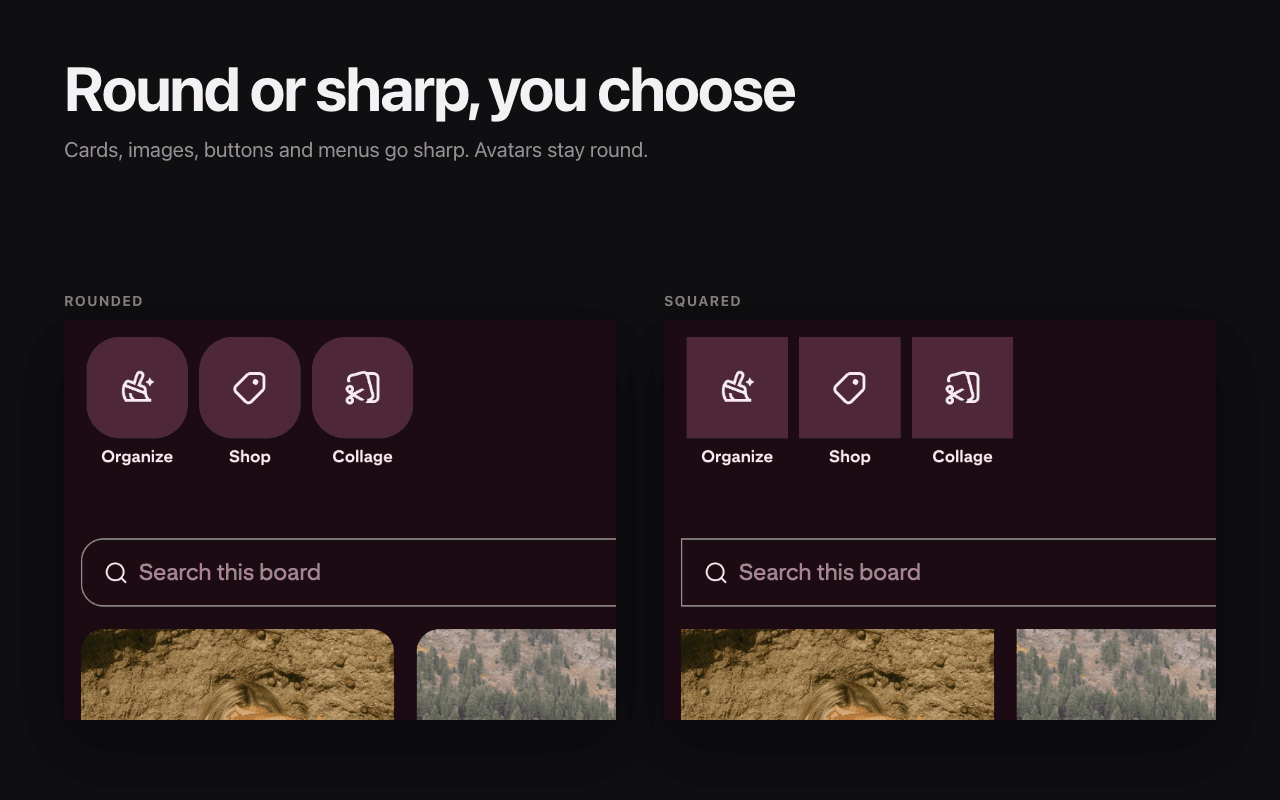
One toggle turns every rounded card, image, and button sharp — the clean, editorial grid look that fans of the classic Pinterest Black Squared userstyle will recognize. If you've been keeping that aging Stylus style alive, the Onyx theme plus squared corners is the same aesthetic as a maintained one-click extension — switches stay pill-shaped and avatars stay round, so the interface still feels right.
Timed night mode and optional Extras
Timed mode shows your night look between hours you set (7 pm to 7 am unless you change it) and your day look the rest of the time. It runs on your device's clock, never your location, and an open Pinterest tab switches by itself at the times you set.
The popup also holds a few Extras, all off until you switch them on:
- Hover buttons: a clean grid without the Save and share overlays on every pin; you save from the pin's own page instead.
- Bigger image: a pin's image shown as large as your screen allows on its page, never cropped.
- Decor: a soft bows or hearts pattern behind the page, tinted to match your theme. It sits behind everything, so it never covers a pin.
The controls live in the toolbar popup, and in Chrome's side panel or Firefox's sidebar, in English, Spanish, Brazilian Portuguese, German, French, Japanese, Russian, and Vietnamese.
Private by design
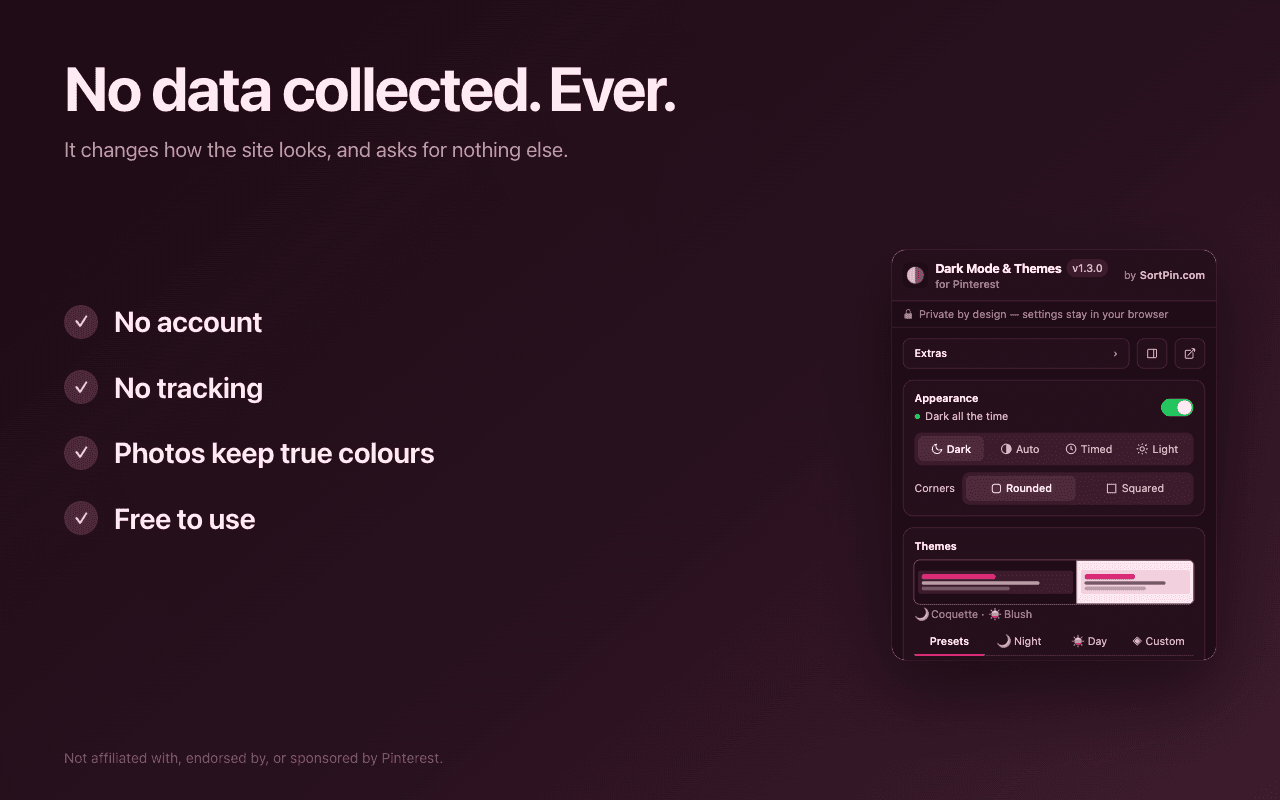
A theme extension has no business knowing what you browse. Dark Mode for Pinterest never connects to the internet — nothing you look at ever leaves your computer. No analytics, no account, no data collection, and it runs on Pinterest pages and nowhere else. Your theme settings live on your device; in Chrome and Firefox they can follow you to your other computers through your own browser profile, and on Safari they simply stay on your Mac. The details are in the Dark Mode for Pinterest privacy policy.
Pinterest dark mode on iPhone & Android
On mobile you don't need an extension — the Pinterest app has dark mode built in, and it follows your phone's system theme. On iPhone or iPad, turn on dark mode in Settings → Display & Brightness → Dark and the app follows. On Android, enable your system dark theme in Settings → Display; many versions of the app also offer an in-app choice under your profile's settings.
The gap is the desktop browser, where Pinterest offers nothing — that's the half of Pinterest browsing this extension takes care of.
Frequently Asked Questions
1. Does Pinterest have dark mode on desktop or PC?
No. Pinterest's built-in dark mode only exists in the iOS and Android apps — its own help center tells desktop visitors that dark mode "is only available for iOS and Android devices". There is no theme setting on pinterest.com in a desktop browser, so the only way to get Pinterest dark mode on a PC, Mac, or laptop is a browser extension like Dark Mode for Pinterest.
2. Is the Pinterest dark mode extension free?
Yes, completely. Every night and day theme, the custom color picker, Auto and Timed modes, squared corners, and the optional Extras are free — no account, no trial, no premium tier, no ads. On Safari, Timed mode and the Extras come with version 1.3 of the app.
3. What is the extension called in the store?
In the Chrome Web Store and on Firefox Add-ons it is "Dark Mode for Pinterest — Pink & Color Themes"; on the Mac App Store it is simply "Dark Mode for Pinterest". It is made by SortPin, and its short name is PinDark.
4. Which browsers does the Pinterest dark mode extension work in?
Chrome, Firefox, and Safari on Mac. Chromium browsers — Microsoft Edge, Brave, Opera, Vivaldi, and Arc — can install the Chrome version from the Chrome Web Store and it works the same way (Edge asks once to allow extensions from other stores, and Opera needs its free "Install Chrome Extensions" add-on first). It runs on Windows, macOS, Linux, and Chromebooks.
5. Will dark mode change how my pins look?
No. The extension recolors the page around your pins — menus, sidebar, search, comments, boards — and your photos and videos keep their true colors: never inverted, dimmed, or washed out, which is what generic dark mode tools routinely do to photos. Anything else that changes on a pin is an option you switch on yourself: squared corners, a bigger image on the pin's page, or a grid without hover buttons.
6. Is it safe and private?
Yes. Dark Mode for Pinterest never connects to the internet (zero network requests), collects no data, has no analytics and no account, and runs only on Pinterest pages. Your settings stay on your device — and in Chrome and Firefox they can follow you to your other computers through your own browser profile.
7. Is there a black or AMOLED theme for Pinterest?
Yes — the Onyx theme is pure true black, made for OLED and AMOLED screens where black pixels are simply off. If you prefer a softer look, Calico is Pinterest's own night palette — a black base with soft warm-gray cards, gentler than Onyx's all-black — and Graphite is a soft charcoal with gentler contrast.
8. Can it switch between light and dark automatically?
Yes, in two ways. Auto follows your system: your chosen night theme while your computer is in dark mode, and Pinterest's own colors or a soft day theme the rest of the time. Timed shows your night theme between hours you set, like 7 pm to 7 am, using your device's clock. You can also turn the whole theme on or off anytime with the Alt+Shift+P shortcut.
9. Can it hide the hover buttons or make pin images bigger?
Yes, with two optional Extras in the popup, both off until you switch them on. Hover buttons gives you a clean grid without the Save and share overlays (you save from the pin's own page instead), and Bigger image shows a pin's image as large as your screen allows on its page, never cropped. There is also Decor: a soft bows or hearts pattern behind the page, tinted to match your theme.
10. Why is Pinterest dark mode not working for me?
On desktop there is no built-in setting, so if a tutorial pointed you to Pinterest's settings, it simply doesn't exist — install an extension instead. If you use Dark Mode for Pinterest alongside a generic dark mode tool like Dark Reader, turn that tool off on pinterest.com so the two aren't darkening the page on top of each other. And if Pinterest ever shows its own dark theme, the extension keeps it as is with Calico (which is Pinterest's own dark look) and paints over it with any other night look or your custom color; a day theme can't show over it. The popup tells you which applies.
11. How do I put Pinterest in dark mode on a Mac or MacBook?
Install Dark Mode for Pinterest in the browser you use on your Mac. In Safari, get it from the Mac App Store (free, macOS 12 or later), open the app once, and switch it on under Safari → Settings → Extensions (Preferences on older macOS). Chrome, Edge, Brave, and Arc work too with the Chrome Web Store version, and Firefox with the Firefox Add-ons version. Then open pinterest.com and pick a night theme from the toolbar icon.
12. Can I get Pinterest dark mode on a Chromebook?
Yes. A Chromebook runs Chrome, so install Dark Mode for Pinterest from the Chrome Web Store, open pinterest.com, and choose a theme from the toolbar icon. On a school or work Chromebook, your administrator may need to allow extensions first.
13. Does it work on iPad or iPhone?
You don't need it there: the Pinterest app on iPhone and iPad has dark mode built in and follows your device's Display & Brightness setting. Dark Mode for Pinterest is for desktop browsers — Chrome, Edge, Firefox, and Safari on Mac.
14. Does it work in the Pinterest app for Windows?
The Windows app is a wrapped website that can't load browser extensions. Use pinterest.com in Chrome, Edge, Firefox, or any Chromium browser with Dark Mode for Pinterest installed instead — same content, real dark mode.
15. Does SortPin have a dark mode?
Yes — SortPin's dark mode is this free, dedicated extension, Dark Mode for Pinterest, made by the SortPin team. The main SortPin extension (sort, filter and download) has a simpler dark mode of its own; this one has every theme and is the one we keep improving. You can keep using SortPin for sorting and downloads: just switch its own dark mode off so the two don't both color the page.
Give Pinterest the dark mode it never shipped
Free on every desktop browser. Install it, pick a theme, and your feed never blinds you at midnight again.
More free Pinterest tools from SortPin
Dark Mode for Pinterest is part of the SortPin toolkit. While you're here: Pinterest Downloader saves images and videos in original quality, the Video Downloader grabs single videos, the Story Downloader fetches every slide of an Idea Pin, and the SortPin extension sorts, filters, and downloads right on pinterest.com.
Not affiliated with, endorsed by, or sponsored by Pinterest. "Pinterest" is a trademark of its owner, used here only to describe what this tool works with.